Path Variables
You have various path variables available. You can use them in home directory, in path permissions settings and make aliases for them.
| Path Variable |
Description |
|---|---|
|
$$username$$ |
Username of currently logged user is stored here. |
|
$$groupname$$ |
Name of the group to which currently logged user belongs. Note: If this user is a member of more groups, just the first group in the list is used. |
|
$$homedir$$ |
Stores path to mailbox folder of currently logged user. |
|
$$email$$ |
Usable only if integrated with the system contains the email address of the user. |
|
$$domain$$ |
Usable only if integrated with the system this path variable contains domain name of the currently logged user. |
Example:
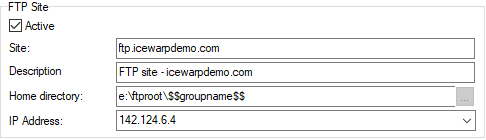
Figure. FTP Site section in FTP Service dialog.
This setting will allow to have separate groups entering separate folders on your computer with one setting only.

